
Executive Summary
When your biggest enterprise customer refuses to upgrade because the new release doesn’t benefit them, but your infrastructure forces all tenants onto the same version, you’re stuck. This is the multi-version multi-tenant problem that every B2B SaaS company with enterprise customers eventually faces.
This case study documents an ongoing Azure Kubernetes Service (AKS) migration that solves this exact problem. The architecture enables independent tenant versioning, reduces infrastructure costs by 22%, and cuts tenant onboarding time from weeks to 30 minutes, while maintaining the stability and compliance requirements that enterprise customers demand.
Key Outcomes:
- Cost Reduction: 22% infrastructure cost savings through elastic scaling
- Deployment Speed: Hours to minutes with canary deployment capabilities
- Tenant Onboarding: Weeks to 30 minutes for system-ready state
- Blast Radius Control: Version isolation prevents cascading failures
- Resource Efficiency: Eliminated resource contention through Kubernetes resource limits
Current Status: Live in lower environments, active observability implementation, production migration planned for Q2 2026.
The Problem Nobody Talks About
If you’re running a B2B SaaS product with enterprise customers, you’ve probably hit this wall: a major customer demands to stay on an older version for compliance reasons. Meanwhile, your infrastructure was designed assuming all tenants run the same version. You can’t innovate for new customers without risking your enterprise revenue.
This is the multi-version multi-tenant problem.
The Business Constraint
Let’s make this concrete with a real scenario:
- You offer 1-year Long Term Support (LTS) for each release
- You ship quarterly releases (4 releases per year)
- At any given time, you’re supporting 4 active versions
- You have 10 enterprise tenants in a region
- Each tenant has different upgrade cycles due to compliance requirements
- Your product runs on 10 microservices
The math: 10 services × 4 versions = 40 potential deployment combinations
And here’s the kicker: when a tenant on version 5.1 wants to upgrade a year later, they might skip directly to 5.5 (latest) or choose 5.4 (stable, battle-tested by other tenants) to minimize risk.
Why This Matters
Enterprise customers don’t upgrade on your schedule. They upgrade when:
- Their compliance audit cycle allows it
- They’ve completed their own testing and validation
- The new features actually benefit their workflow
- They have operational bandwidth for the change
Forcing upgrades means risking customer churn. Not supporting multiple versions means you can’t sell to enterprises in the first place.
Why Traditional VM-Based Solutions Don’t Work
When this problem first emerged, we evaluated three approaches. All of them failed for different reasons.
Option 1: Provision 4× Infrastructure
The Approach: Run separate VM clusters for each supported version.
Why It Fails:
- Expensive: Four full production environments with high-spec VMs running 24/7
- Wasteful: Most tenants don’t hit peak load simultaneously, but you’re provisioned for worst-case across all versions
- Operational Nightmare: Managing four separate infrastructure stacks, four sets of monitoring, four deployment pipelines
Real Cost: If you’re running 4 VMs at $800/month each with over-provisioned resources for peak loads, that’s $38,400/year just for compute. Plus storage, networking, and operational overhead.
Option 2: Force All Tenants to Same Version
The Approach: Everyone upgrades together or not at all.
Why It Fails:
- Customer Churn Risk: Enterprise customers will walk away rather than accept forced upgrades during their busy season
- No Blast Radius Control: When a new version has a bug, everyone is impacted simultaneously
- Lost Deals: You can’t close enterprise contracts that require version stability guarantees
Real Impact: One bad release affects 100% of your revenue. No enterprise wants that risk.
Option 3: Manual Deployment Per Tenant
The Approach: Spin up dedicated infrastructure for each tenant manually.
Why It Fails:
- Doesn’t Scale: Works for 5-10 tenants, breaks down at 50+
- Human Error: Manual deployments mean configuration drift and mistakes
- Slow Onboarding: New tenant setup takes weeks of engineering time
- Maintenance Hell: Every patch, every security update, every configuration change needs manual intervention across all tenant deployments
Real Impact: At 20 tenants, your engineering team spends more time on deployment management than feature development.
The VM Resource Contention Problem
Even if you solve the versioning problem, VMs have another critical flaw: resource contention.
When one service consumes excessive CPU or memory (due to a bug, unexpected load, or resource leak), it impacts every other service on that VM. There’s no isolation, no resource limiting, no automatic recovery.
Example: A background job service starts consuming 90% CPU due to a bug. Now your API services are slow, your database queries timeout, and your monitoring system can’t even alert you because it’s also starved for resources.
On VMs, your only option is to over-provision resources “just in case,” which brings you back to the cost problem.
The Architecture Decision Tree
When traditional approaches fail, you need to rethink the fundamentals. Here’s how we evaluated and chose each component of our Kubernetes-based solution.
Decision 1: Why Kubernetes?
The Core Question: Why not stick with VMs and try harder?
The Answer: Because the problem isn’t about trying harder. It’s about having the wrong primitives.
Kubernetes provides four capabilities that VMs fundamentally can’t:
- Resource Isolation: Every pod gets CPU/memory limits. One service can’t starve another.
- Declarative State: You declare “I want version 2.1 of service X running,” and K8s maintains that state.
- Auto-Healing: Pod crashes? K8s restarts it. Node fails? K8s reschedules pods elsewhere.
- Elastic Scaling: Scale individual services based on demand, not entire VM instances.
Why This Matters for Multi-Version: You can run v3.0, v3.1, v3.2, and v3.3 of the same service simultaneously, each in isolated pods with their own resource guarantees. When v3.2 has a bug and crashes, only tenants on v3.2 are affected. Everyone else keeps running.
Decision 2: Why YARP Over Istio/Envoy?
The Core Question: Why not use a service mesh like Istio or an API gateway like Kong?
The Evaluation:
| Solution | Pros | Cons |
|---|---|---|
| Istio | Full-featured service mesh, strong mTLS | Heavy (sidecar overhead), complex for our use case, overkill for tenant routing |
| Kong/Envoy | Battle-tested API gateways | Not designed for dynamic tenant-to-version routing, requires custom plugins |
| YARP | .NET native, lightweight, designed for dynamic routing | Younger ecosystem, less community content |
Why We Chose YARP:
YARP (Yet Another Reverse Proxy) from Microsoft solved our exact problem with minimal complexity:
// YARP configuration for tenant-aware routing
public class TenantVersionTransformer : IHttpTransformer
{
    private readonly ITenantConfigService _tenantConfig;

    public async ValueTask TransformRequestAsync(
        HttpContext httpContext,
        HttpRequestMessage proxyRequest,
        string destinationPrefix)
    {
        // Extract tenant from subdomain (e.g., acme.demodeck.xyz)
        var tenant = httpContext.Request.Host.Host.Split('.')[0];

        // Get tenant's version from database (with in-memory caching)
        var version = await _tenantConfig.GetVersionAsync(tenant);

        // Route to version-specific service
        var service = httpContext.Request.Path.Value.Split('/')[2];
        proxyRequest.RequestUri = new Uri(
            $"http://{service}-api-v{version.Replace(".", "-")}.shared-services.svc.cluster.local:80"
        );
    }
}
Key Benefits:
- Tenant context extraction from subdomain
- Dynamic version lookup from database (cached in-memory)
- Internal cluster routing to version-specific pods
- All routing logic in one place, no sidecar overhead
Trade-off We Accepted: Less built-in observability than Istio. We compensate with Application Insights and Azure Monitor.
Decision 3: Why Helm for Tenant Configuration?
The Core Question: Why not use a database or configuration service?
The Answer: Because tenant infrastructure state should be declarative and version-controlled.
When you declare “Tenant Acme runs version 3.0,” that affects:
- Which pods need to be running
- What version of container images to deploy
- What resource limits to set
- What ingress rules to create
Helm Values Structure:
# values-qa.yaml
global:
  domain: demodeck.xyz
  environment: qa
  region: eastus

# Version configurations
versions:
  v3_0:
    enabled: true
    services:
      authAPI:
        image: demodeck-auth-api:v3.0.0
        replicas: 2
        resources:
          limits:
            cpu: "1000m"
            memory: "1Gi"

  v3_2:
    enabled: true
    services:
      authAPI:
        image: demodeck-auth-api:v3.2.0
        replicas: 2

# Tenant list
tenants:
  list:
    acme:
      enabled: true
      subdomain: acme
      version: "3.0"
      image: demodeck-ui:v3.0.0
      replicas: 2
Why This Works:
- Version Control: Tenant configs live in Git, full audit history
- Declarative Rollback:
helm rollbackundoes any change - Template Reuse: Same Helm chart, different values per tenant
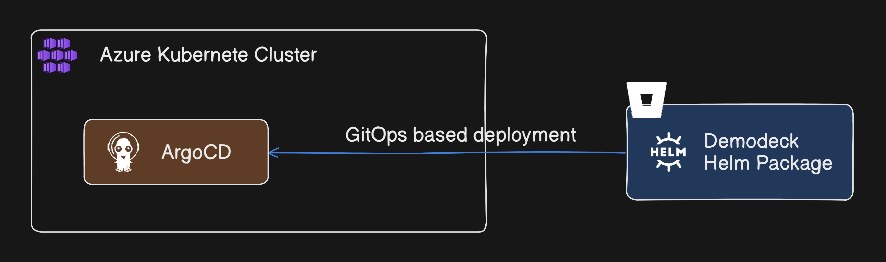
- GitOps Ready: ArgoCD watches these values and auto-syncs
Trade-off We Accepted: Helm deployments take 30-60 seconds. For tenant onboarding, that’s fine. For real-time version routing, we use database lookups.
Decision 4: Why App Gateway + AGIC?
The Core Question: Why not use Kubernetes Ingress controllers like NGINX?
The Answer: Because we needed Azure-native integration and dynamic service discovery.
Architecture Flow:
- App Gateway receives external traffic (SSL/TLS termination)
- AGIC (Application Gateway Ingress Controller) watches Kubernetes services
- AGIC dynamically updates App Gateway backend pools when pods scale or change
- App Gateway routes to YARP pods inside the cluster
- YARP handles tenant-to-version routing internally
Why This Matters:
- No manual backend pool configuration
- Auto-scaling pods are automatically added to load balancing
- Azure WAF integration for security
- Azure-native monitoring and diagnostics
Trade-off We Accepted: Tighter Azure coupling. If we move to GCP or AWS, we’d replace with their native equivalents (Cloud Load Balancer + NEG, ALB + Target Groups).
The Architecture: Two Routing Patterns
The architecture uses different routing strategies for tenant UI apps versus backend API services. This hybrid approach optimizes for each workload type.
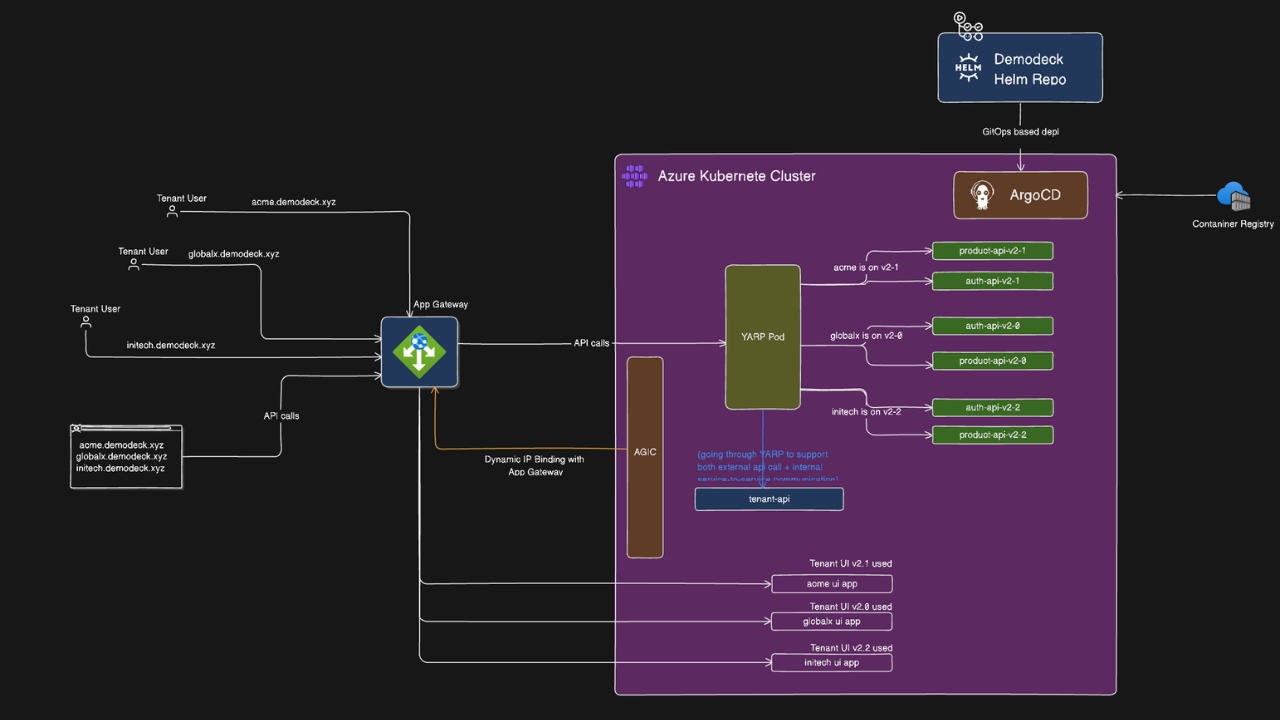
Pattern 1: Tenant UI Apps (Direct Ingress Routing)
Tenant UI apps are statically routed via ingress because each tenant has a dedicated UI deployment with tenant-specific branding and configuration.
Request Flow:
User: acme.qa.eastus.demodeck.xyz
↓
App Gateway (SSL termination)
↓
AGIC routes to: acme-ui-service (via tenant-specific ingress)
↓
acme-ui pod (running v3.2 image with tenant branding)
Why Direct Routing for UI:
- Each tenant UI is a separate deployment with custom branding
- No need for dynamic version routing (UI version matches tenant’s backend version)
- Simpler troubleshooting (dedicated ingress per tenant)
- Tenant-specific configurations (themes, logos, domain names)
Helm Template (tenant-ui.yaml):
{{- range $tenantName, $tenant := .Values.tenants.list }}
{{- if $tenant.enabled }}
---
# {{ $tenantName }} Tenant UI Deployment
apiVersion: apps/v1
kind: Deployment
metadata:
  name: {{ $tenantName }}-ui
  namespace: {{ $.Values.tenants.namespace }}
  labels:
    app: tenant-ui
    tenant: {{ $tenantName }}
    version: {{ $tenant.version }}
spec:
  replicas: {{ $tenant.replicas }}
  selector:
    matchLabels:
      app: tenant-ui
      tenant: {{ $tenantName }}
  template:
    metadata:
      labels:
        app: tenant-ui
        tenant: {{ $tenantName }}
        version: {{ $tenant.version }}
    spec:
      containers:
      - name: tenant-ui
        image: {{ $.Values.global.registry }}/{{ $tenant.image }}
        ports:
        - containerPort: {{ $.Values.tenants.common.port }}
        env:
        - name: TENANT_NAME
          value: {{ $tenantName }}
        - name: TENANT_VERSION
          value: {{ $tenant.version }}
        resources:
          {{- toYaml $.Values.tenants.common.resources | nindent 10 }}
---
# {{ $tenantName }} Tenant UI Service
apiVersion: v1
kind: Service
metadata:
  name: {{ $tenantName }}-ui-service
  namespace: {{ $.Values.tenants.namespace }}
spec:
  selector:
    app: tenant-ui
    tenant: {{ $tenantName }}
  ports:
  - protocol: TCP
    port: 80
    targetPort: {{ $.Values.tenants.common.port }}
---
# {{ $tenantName }} Tenant UI Ingress (Direct routing)
apiVersion: networking.k8s.io/v1
kind: Ingress
metadata:
  name: {{ $tenantName }}-ui-ingress
  namespace: {{ $.Values.tenants.namespace }}
  annotations:
    kubernetes.io/ingress.class: azure/application-gateway
    appgw.ingress.kubernetes.io/use-private-ip: "false"
spec:
  rules:
  - host: {{ $tenantName }}.{{ $.Values.global.environment }}.{{ $.Values.global.region }}.{{ $.Values.global.domain }}
    # Example: acme.qa.eastus.demodeck.xyz
    http:
      paths:
      - path: /
        pathType: Prefix
        backend:
          service:
            name: {{ $tenantName }}-ui-service
            port:
              number: 80
{{- end }}
{{- end }}
Result: One Helm template creates dedicated UI deployments, services, and ingress rules for every tenant in the list.
Pattern 2: API Services (Intelligent Routing via YARP)
Backend API services use YARP for dynamic tenant-to-version routing because multiple tenants share the same versioned services for resource efficiency.
Request Flow:
User: acme.demodeck.xyz/api/products
↓
App Gateway (SSL termination)
↓
AGIC routes to: yarp-router-service
↓
YARP pod:
  1. Extract tenant from subdomain: "acme"
  2. Lookup version from database (via tenant-api): "3.2"
  3. Check in-memory cache (refresh during maintenance window)
  4. Route to: product-api-v3-2-service.shared-services.svc.cluster.local:80
↓
Kubernetes Service: product-api-v3-2-service
↓
Pod: product-api-v3-2 (one of 3 replicas)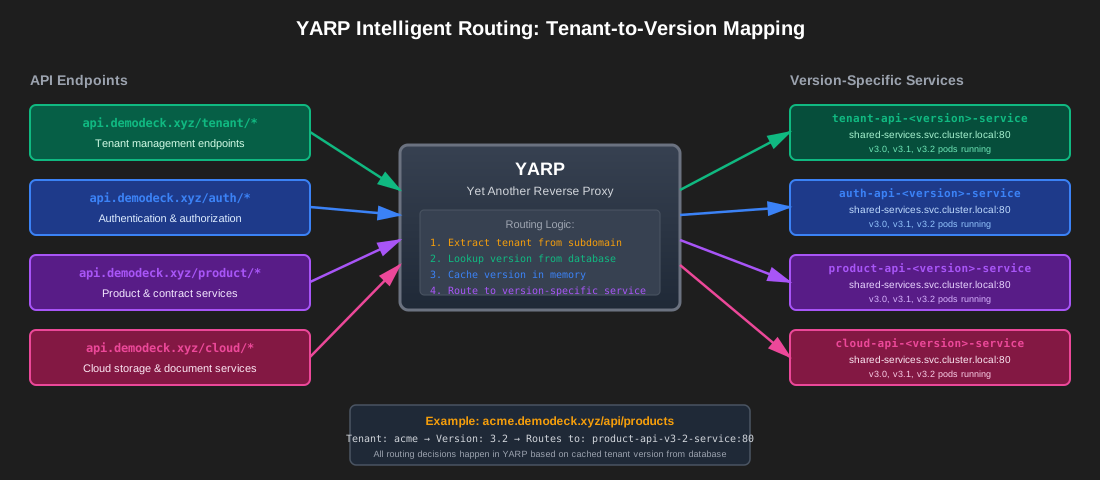
Why YARP for APIs:
- Multiple tenants on same version share pods (resource efficiency)
- Dynamic version switching without ingress reconfiguration
- Centralized routing logic (one place to manage tenant-to-version mapping)
- Database-driven routing (version changes don’t require redeployment)
YARP Tenant Routing Implementation:
// TenantConfigService.cs - Database lookup with in-memory caching
public class TenantConfigService : ITenantConfigService
{
    private readonly HttpClient _httpClient;
    private readonly IMemoryCache _cache;
    private readonly ILogger<TenantConfigService> _logger;

    public TenantConfigService(
        HttpClient httpClient,
        IMemoryCache cache,
        ILogger<TenantConfigService> logger)
    {
        _httpClient = httpClient;
        _cache = cache;
        _logger = logger;
    }

    public async Task<string> GetVersionAsync(string tenantId)
    {
        // Check in-memory cache first (fast path)
        if (_cache.TryGetValue($"tenant:{tenantId}:version", out string cachedVersion))
        {
            return cachedVersion;
        }

        // Cache miss - fetch from tenant-api
        var response = await _httpClient.GetAsync(
            $"http://tenant-api.{Environment.GetEnvironmentVariable("ENVIRONMENT")}.demodeck.xyz/api/v1/TenantProvider/{tenantId}"
        );

        response.EnsureSuccessStatusCode();
        var tenantData = await response.Content.ReadFromJsonAsync<TenantResponse>();
        var version = tenantData.Version;

        // Cache with sliding expiration
        // Refreshes during maintenance window only
        _cache.Set(
            $"tenant:{tenantId}:version",
            version,
            new MemoryCacheEntryOptions
            {
                SlidingExpiration = TimeSpan.FromHours(24),
                Priority = CacheItemPriority.High
            }
        );

        _logger.LogInformation(
            "Tenant {TenantId} version {Version} cached",
            tenantId,
            version
        );

        return version;
    }

    // Called during maintenance window to refresh cache
    public void InvalidateCache()
    {
        _logger.LogInformation("Invalidating tenant version cache during maintenance window");
        // Cache naturally expires or gets refreshed on next request
    }
}
Why In-Memory Cache Over Redis:
- Lower Latency: No network hop (sub-millisecond cache lookups)
- Acceptable Staleness: Tenant versions change infrequently (only during maintenance windows)
- Simpler Infrastructure: No Redis cluster to manage
- Cost Savings: One less service to run and monitor
Trade-off: Cache could be stale between maintenance windows. This is acceptable because version changes are coordinated events, not real-time operations.
Implementation Reality: Where We Are Now
This isn’t a post-mortem case study. The migration is happening right now, and we’re documenting it as we go.
Current Phase: Lower Environment Live
What’s Running:
- 14 microservices deployed to AKS
- Multi-version pods running simultaneously (v3.0, v3.1, v3.2)
- YARP routing live with test tenants
- ArgoCD watching Helm charts in Git repo
- Basic health checks and readiness probes
What’s Working:
- Tenant requests are correctly routed to version-specific pods
- Independent scaling (v3.2 product-api runs 3 replicas, v3.0 runs 2)
- Blast radius isolation (we intentionally crashed v3.2 auth-api, other versions unaffected)
- GitOps workflow (commit to Git → ArgoCD syncs → pods updated)
Current Focus: Observability Layer
Before production migration, we need to see what’s happening inside the cluster.
What We’re Implementing:
- Application Insights: Distributed tracing across service calls
- Azure Monitor: Cluster-level metrics (node health, pod resource usage)
- Log Analytics: Centralized logging with KQL queries
- Custom Dashboards: Tenant-specific views (which version, resource consumption, error rates)
Why This Matters: In a multi-version environment, you need to answer questions like:
- “Which tenants are on v3.2 and experiencing high latency?”
- “Is v3.3 consuming more memory than v3.1?”
- “If we upgrade Tenant X from v3.1 to v3.3, what’s the resource impact?”
Without observability, you’re flying blind.
Next Phase: GitOps Automation
The Goal: Remove manual intervention from deployments.
What We’re Building:
- Automated Tenant Onboarding: New tenant → Helm values generated → ArgoCD deploys → tenant ready
- Version Upgrade Pipeline: Database update → pod restart → tenant upgraded
- Automated Rollback: Health check fails → ArgoCD auto-rolls back to previous state
Current Blocker: None. We’re just prioritizing observability first because we need visibility before automating more deployments.
Then: Team Training
The Reality: Kubernetes isn’t VMs. The operational model is different.
Training Focus:
- kubectl basics (get pods, logs, exec)
- Helm chart structure and values
- GitOps workflow (how to onboard a tenant, how to upgrade versions)
- Troubleshooting patterns (pod crash loops, resource limits, networking)
- Incident response (how to rollback, how to isolate issues)
Why This Can’t Wait: Production migration with an unprepared team is a recipe for disaster.
Finally: Production Migration
The Plan:
- Pilot tenants first (smallest, most forgiving customers)
- Monitor for 2 weeks
- Gradual rollout in batches
- Keep VM infrastructure running in parallel during migration
- Full production cutover after 90% of tenants migrated successfully
Timeline: Q2 2026 (targeting April/May)
Early Wins: Validation Before Production
Even in lower environments, we’re seeing concrete improvements that validate the architectural decisions.
1. Infrastructure Cost Reduction: 22%
Before (VM-based):
- 4 dedicated VMs with high-spec provisioning for peak load
- Always-on, always-provisioned
- Estimated cost: ~$3,200/month
After (AKS-based):
- 3 nodes (Standard_D4s_v3) as baseline
- Auto-scale to 5-6 nodes during peak demand
- Estimated cost: ~$2,500/month (average)
Cost Savings: 22% reduction in infrastructure spend
Why This Works:
- Elastic Scaling: Only pay for what you use during peak times
- Better Resource Density: Multiple tenants share underlying nodes, but isolated at pod level
- No Over-Provisioning: Kubernetes scheduler packs pods efficiently
Note: This is a conservative estimate. As we optimize resource requests/limits and tune pod density, we expect further savings.
2. Deployment Speed: Hours to Minutes
Before (VM-based):
- Stop services on VM
- Copy new binaries
- Update configuration files
- Restart services
- Verify health across all services
- Total time: 2-4 hours
After (AKS-based):
- Push new Docker image to container registry
- Update Helm chart version
- ArgoCD detects change and syncs
- Rolling update with zero downtime
- Total time: 5-10 minutes
Added Benefit: Canary Deployments
With VMs, it was all-or-nothing. With Kubernetes, we can now do:
# Canary deployment: send 10% of traffic to new version
apiVersion: apps/v1
kind: Deployment
metadata:
  name: product-api-v3-3-canary
spec:
  replicas: 1  # Start small (10% of total capacity)
  template:
    metadata:
      labels:
        app: product-api
        version: "3.3"
        track: canary
Impact: Test new versions in production with minimal risk. If canary shows errors, roll back before impacting all tenants on that version.
3. Tenant Onboarding: Weeks to 30 Minutes
Before (VM-based):
- Provision new VM or allocate space on existing VM
- Install all services manually
- Configure network routing
- Set up monitoring
- Test connectivity
- Hand off to customer for configuration
- Total time: 2-3 weeks
After (AKS-based):
- Add tenant entry to Helm values file
- Configure tenant database entry
- Commit to Git
- ArgoCD deploys all services
- YARP automatically routes tenant subdomain
- System ready for customer configuration
- Total time: 30 minutes (mostly waiting for pods to pull images)
Business Impact: Sales can promise “your environment will be ready tomorrow” instead of “give us 2-3 weeks.”
4. Blast Radius Control: Version Isolation
The Test: We intentionally introduced a null reference exception in v3.2 of the auth-api service.
VM Outcome (simulated from past experience):
- Service crashes
- All tenants impacted
- Manual restart required
- Incident lasts 15-30 minutes
AKS Outcome:
- v3.2 pod crashes
- Kubernetes immediately restarts pod (auto-healing)
- Only tenants on v3.2 experience brief disruption (~10 seconds)
- Tenants on v3.0, v3.1, v3.3 completely unaffected
- Logs show crash, but service recovers automatically
Why This Matters: In a multi-version environment, bugs in one version don’t cascade across all customers.
5. Resource Contention: Eliminated
The Test: We ran a CPU-intensive background job in the product-api v3.2 pod.
VM Outcome (past experience):
- CPU spikes to 90%
- All other services on that VM slow down
- API latency increases
- Database connections timeout
- Eventually crashes other services
AKS Outcome:
- CPU limit enforced at pod level (defined as 2000m = 2 cores)
- Pod hits CPU limit, job slows down
- Other pods on same node completely unaffected
- API latency remains normal
- No cascade failures
Kubernetes Resource Configuration:
resources:
  limits:
    cpu: "2000m"     # Hard limit: can't exceed 2 cores
    memory: "2Gi"    # Hard limit: OOMKilled if exceeded
  requests:
    cpu: "1000m"     # Guaranteed: scheduler ensures node has this available
    memory: "1Gi"    # Guaranteed: scheduler ensures node has this available
Business Impact: One tenant’s workload spike doesn’t degrade performance for other tenants.
Helm Chart Structure: Multi-Environment, Multi-Region, Multi-Version
The Helm chart is structured to support multiple environments, regions, and versions through layered configuration files.
Repository Layout
demodeck-helm-chart/
├── Chart.yaml
├── values.yaml                    # Base defaults
├── values-qa.yaml                 # QA environment overrides
├── values-uat.yaml                # UAT environment overrides
├── values-prod.yaml               # Production base config
├── values-prod-eastus.yaml        # Region-specific overrides
├── values-prod-westus.yaml        # (8 production regions total)
├── templates/
│   ├── _helpers.tpl               # Shared template functions
│   ├── services/
│   │   ├── auth-api.yaml          # Multi-version aware
│   │   ├── product-api.yaml
│   │   └── ... (14 services)
│   ├── tenants/
│   │   └── tenant-ui.yaml         # Loops over tenant list
│   ├── shared/
│   │   └── tenant-api.yaml        # YARP routing service
│   └── NOTES.txt
└── argocd/
    ├── qa.yaml                    # ArgoCD application for QA
    └── prod/
        ├── eastus.yaml            # ArgoCD apps for 8 regions
        └── ...
Layered Configuration Pattern
Values files layer on top of each other, with later files overriding earlier ones:
# QA deployment
helm install demodeck . \
  -f values.yaml \
  -f values-qa.yaml

# Production East US deployment
helm install demodeck . \
  -f values.yaml \
  -f values-prod.yaml \
  -f values-prod-eastus.yaml
Why This Works:
- Base Configuration: Common settings across all environments
- Environment Overrides: QA uses smaller resources than production
- Regional Overrides: Different database endpoints, registry locations
- Single Source of Truth: All config in Git, version-controlled
Multi-Version Values Structure
# values-qa.yaml
global:
  domain: demodeck.xyz
  environment: qa
  region: eastus
  registry: myregistry.azurecr.io

# Version configurations (multiple versions enabled simultaneously)
versions:
  v3_0:
    enabled: true
    services:
      authAPI:
        image: demodeck-auth-api:v3.0.0
        replicas: 2
        port: 8080
        resources:
          limits:
            cpu: "1000m"
            memory: "1Gi"
          requests:
            cpu: "500m"
            memory: "512Mi"

      productAPI:
        image: demodeck-productapi:v3.0.1
        replicas: 2
        resources:
          limits:
            cpu: "2000m"
            memory: "2Gi"
          requests:
            cpu: "1000m"
            memory: "1Gi"

      # ... 12 more services

  v3_1:
    enabled: true
    services:
      authAPI:
        image: demodeck-auth-api:v3.1.0
        replicas: 2
      productAPI:
        image: demodeck-productapi:v3.1.0
        replicas: 3

  v3_2:
    enabled: true
    services:
      authAPI:
        image: demodeck-auth-api:v3.2.0
        replicas: 2
      productAPI:
        image: demodeck-productapi:v3.2.1
        replicas: 3

  v3_3:
    enabled: false  # Not yet deployed to this environment

# Tenant configuration
tenants:
  namespace: tenants
  common:
    port: 80
    resources:
      limits:
        cpu: "500m"
        memory: "512Mi"
      requests:
        cpu: "250m"
        memory: "256Mi"

  list:
    acme:
      enabled: true
      subdomain: acme
      version: "3.0"
      image: demodeck-ui:v3.0.0
      replicas: 2

    globalx:
      enabled: true
      subdomain: globalx
      version: "3.2"
      image: demodeck-ui:v3.2.0
      replicas: 2

    initech:
      enabled: true
      subdomain: initech
      version: "3.1"
      image: demodeck-ui:v3.1.0
      replicas: 2
Multi-Version Service Template
Services use a loop to create deployments for all enabled versions:
# templates/services/auth-api.yaml
{{- range $versionKey, $versionConfig := .Values.versions }}
{{- if $versionConfig.enabled }}
---
# Auth API {{ $versionKey }} Deployment
apiVersion: apps/v1
kind: Deployment
metadata:
  name: auth-api-{{ $versionKey | replace "_" "-" }}
  namespace: {{ $.Values.services.namespace }}
  labels:
    app: auth-api
    service: auth-api
    version: {{ $versionKey }}
spec:
  replicas: {{ $versionConfig.services.authAPI.replicas }}
  selector:
    matchLabels:
      app: auth-api
      version: {{ $versionKey }}
  template:
    metadata:
      labels:
        app: auth-api
        version: {{ $versionKey }}
    spec:
      containers:
      - name: auth-api
        image: {{ $.Values.global.registry }}/{{ $versionConfig.services.authAPI.image }}
        ports:
        - containerPort: {{ $versionConfig.services.authAPI.port }}
        env:
        - name: ASPNETCORE_ENVIRONMENT
          value: {{ $.Values.global.environment }}
        - name: SERVICE_VERSION
          value: {{ $versionKey }}
        resources:
          {{- toYaml $versionConfig.services.authAPI.resources | nindent 10 }}
        livenessProbe:
          httpGet:
            path: /health
            port: {{ $versionConfig.services.authAPI.port }}
          initialDelaySeconds: 50
          periodSeconds: 15
        readinessProbe:
          httpGet:
            path: /health
            port: {{ $versionConfig.services.authAPI.port }}
          initialDelaySeconds: 50
          periodSeconds: 15
---
# Auth API {{ $versionKey }} Service
apiVersion: v1
kind: Service
metadata:
  name: auth-api-{{ $versionKey | replace "_" "-" }}-service
  namespace: {{ $.Values.services.namespace }}
  labels:
    app: auth-api
    service: auth-api
    version: {{ $versionKey }}
spec:
  selector:
    app: auth-api
    version: {{ $versionKey }}
  ports:
  - protocol: TCP
    port: 80
    targetPort: {{ $versionConfig.services.authAPI.port }}
  type: ClusterIP
{{- end }}
{{- end }}
Result: When versions.v3_0.enabled: true, versions.v3_1.enabled: true, and versions.v3_2.enabled: true, this single template creates:
- 3 Deployments:
auth-api-v3-0,auth-api-v3-1,auth-api-v3-2 - 3 Services:
auth-api-v3-0-service,auth-api-v3-1-service,auth-api-v3-2-service
YARP routes tenants to the appropriate service based on their version.
Multi-Region Context
While this case study focuses on multi-version architecture, the Helm structure also supports multi-region deployments.
Regional overrides handle:
- Database connection strings (region-specific SQL instances)
- Container registry endpoints (geo-replicated Azure Container Registries)
- Resource sizing (different load patterns per region)
- Compliance requirements (data residency rules)
Example:
# values-prod-eastus.yaml (regional overrides)
global:
  region: eastus
  registry: myregistry-eastus.azurecr.io

versions:
  v3_2:
    services:
      authAPI:
        replicas: 5  # Higher load in East US
      productAPI:
        replicas: 8
The same Helm chart and GitOps workflow manages all regions with different scale parameters.
Release and Upgrade Process: Phased Rollout Strategy
New releases don’t go directly to all tenants. We use a phased approach that balances innovation speed with enterprise stability requirements.
Phase 1: Pre-Deployment (Day 0)
Build and Deploy All Services:
- Build container images for all 14 services:
# Example: Building v3.3 release
docker build -t myregistry.azurecr.io/demodeck-auth-api:v3.3.0 ./auth-api
docker build -t myregistry.azurecr.io/demodeck-productapi:v3.3.0 ./product-api
# ... 12 more services

docker push myregistry.azurecr.io/demodeck-auth-api:v3.3.0
docker push myregistry.azurecr.io/demodeck-productapi:v3.3.0- Update Helm values to enable new version:
# values-qa.yaml
versions:
  v3_3:  # New release
    enabled: true
    services:
      authAPI:
        image: demodeck-auth-api:v3.3.0
        replicas: 2
      productAPI:
        image: demodeck-productapi:v3.3.0
        replicas: 3
# ... all 14 services- Commit to Git → ArgoCD syncs → All v3.3 pods deployed
Result: All v3.3 services running in the cluster, but no tenants using them yet.
Phase 2: Dummy Tenant Validation (Week 1-2)
Internal Testing with Synthetic Tenant:
- Deploy internal test tenant “acme” on v3.3:
tenants:
  list:
    acme:  # Internal test tenant
      enabled: true
      subdomain: acme
      version: "3.3"
      image: demodeck-ui:v3.3.0
replicas: 1- Configure database:
UPDATE tenants
SET version = '3.3'
WHERE tenant_id = 'acme';- Run validation:
- Automated smoke tests
- Load testing (simulate peak traffic)
- Security scanning
- Performance benchmarking vs. previous versions
Purpose: Catch obvious bugs before any customer exposure.
Typical Findings:
- Configuration issues
- Resource limit misconfigurations
- Integration failures with external services
- Performance regressions
Phase 3: Low-Risk Tenant Migration (Week 2-4)
Who Migrates First:
- Small customers (< 100 users)
- Lower transaction volumes
- Flexible upgrade windows
- More tolerant of potential issues
- Internal trial accounts
Why This Phase Exists: Early bug detection in real-world usage patterns that synthetic tests don’t catch.
Process:
- Select 5-10 low-risk tenants
- Schedule maintenance windows
- Update database:
UPDATE tenants
SET version = '3.3'
WHERE tenant_id IN ('tenant1', 'tenant2', 'tenant3');- Restart tenant pods (or wait for cache refresh)
- Monitor closely for 48 hours
During This Phase:
- Fix bugs discovered by low-risk tenants
- Release patches: v3.3.1, v3.3.2, v3.3.3
- Update Helm values with patched images
- Low-risk tenants automatically get patches via rolling updates
Typical Issues Found:
- Edge case bugs in specific workflows
- Unexpected load patterns
- Integration issues with customer-specific configurations
Phase 4: General Availability (Week 4-8)
Who Migrates:
- Most tenants (60-70% of customer base)
- Standard SLAs
- Normal transaction volumes
- Regular maintenance windows
Process:
- Batch migrations (10-20 tenants per maintenance window)
- Stagger across different maintenance windows (not all at once)
- Monitor each batch for 24 hours before next batch
By this phase, v3.3 has been:
- Validated by internal testing
- Battle-tested by low-risk tenants
- Patched multiple times (now on v3.3.5 or higher)
Why Batching:
- Reduces blast radius if new issues emerge
- Allows time for monitoring and rollback if needed
- Spreads operational load across team
Phase 5: Enterprise/High-Risk Tenants (Month 2-3)
Who Waits:
- Large enterprise customers (1000+ users)
- High transaction volumes (can’t tolerate downtime)
- Strict compliance requirements
- Contractual SLAs for stability
- Mission-critical workflows
Why They Wait:
- They need proven stability (v3.3 has now been running for 1-2 months)
- Compliance audits require stable releases
- They schedule upgrades during their own maintenance windows (not ours)
- They perform their own testing before upgrading
Process:
- Tenant requests upgrade (or we offer when ready)
- Tenant runs their own UAT on v3.3 in sandbox environment
- Tenant schedules maintenance window (often 3-6 months after release)
- We perform upgrade during their window
- Extended monitoring (72 hours post-upgrade)
By the time enterprise tenants upgrade, v3.3 might be on patch v3.3.8 with all bugs fixed.
Upgrade Mechanics: Database-Driven Version Switch
How Tenant Versions Change:
Version changes happen at the database level, not Helm level:
-- Before upgrade
SELECT tenant_id, version FROM tenants WHERE tenant_id = 'bigcorp';
-- Result: bigcorp | 3.1

-- During maintenance window
UPDATE tenants
SET version = '3.3', updated_at = NOW()
WHERE tenant_id = 'bigcorp';

-- After upgrade
SELECT tenant_id, version FROM tenants WHERE tenant_id = 'bigcorp';
-- Result: bigcorp | 3.3
YARP Cache Refresh:
Option 1: Wait for cache expiration (24 hours sliding window)
Option 2: Restart YARP pods to force immediate cache refresh:
kubectl rollout restart deployment yarp-router -n routingOption 3: Call cache invalidation endpoint:
curl -X POST http://yarp-router.routing.svc.cluster.local/admin/cache/invalidateNext Request Flow:
User: bigcorp.demodeck.xyz/api/products
↓
YARP: Cache miss or invalidated
↓
YARP: Call tenant-api for version
↓
tenant-api: SELECT version FROM tenants WHERE tenant_id = 'bigcorp'
↓
tenant-api: Returns "3.3"
↓
YARP: Routes to product-api-v3-3-service:80
↓
BigCorp now running on v3.3
Rollback:
If issues emerge, rollback is instant:
-- Rollback to previous version
UPDATE tenants
SET version = '3.1'
WHERE tenant_id = 'bigcorp';

-- Restart YARP or wait for cache refresh
kubectl rollout restart deployment yarp-router -n routing
Next request routes back to v3.1 pods. No Helm changes, no redeployment, no downtime.
Why This Phased Approach Works
For Early Adopters:
- Get new features first
- Help shape product direction
- Accept slightly higher risk for early access
For Enterprise Customers:
- Get proven stability
- Upgrade on their schedule
- Contractual SLAs protected
For Engineering Team:
- Controlled rollout reduces blast radius
- Early feedback before wide deployment
- Time to fix bugs before enterprise exposure
- No forced upgrades that risk churn
Key Insight: Not all tenants upgrade immediately. Low-risk tenants are early bug detectors. Enterprise tenants upgrade to stable releases only.
Tenant Onboarding: 30 Minutes from Request to Ready
Adding a new tenant to the system is now a matter of configuration, not infrastructure provisioning.
The Complete Onboarding Process
Step 1: Add Tenant to Helm Values (5 minutes)
Edit the environment-specific values file:
# values-qa.yaml
tenants:
  list:
    # Existing tenants...
    acme:
      enabled: true
      subdomain: acme
      version: "3.0"
      image: demodeck-ui:v3.0.0
      replicas: 2

    # New tenant
    newcorp:
      enabled: true
      subdomain: newcorp
      version: "3.2"  # Start on stable, proven version
      image: demodeck-ui:v3.2.0
      replicas: 2
Step 2: Commit to Git (2 minutes)
git add values-qa.yaml
git commit -m "Onboard newcorp tenant on v3.2"
git push origin main
Step 3: ArgoCD Deploys Resources (20 minutes)
ArgoCD detects the Git change and creates:
- Deployment:
newcorp-ui(2 replicas) - Service:
newcorp-ui-service - Ingress: Routes
newcorp.qa.eastus.demodeck.xyzto service
What Takes Time:
- Pulling container images (~15 minutes for 6GB images)
- Pod startup and readiness probes (~5 minutes)
- Ingress propagation (~2 minutes)
Step 4: Database Configuration (5 minutes)
Configure tenant metadata:
INSERT INTO tenants (
    tenant_id,
    subdomain,
    version,
    region,
    environment,
    created_at
)
VALUES (
    'newcorp',
    'newcorp',
    '3.2',
    'eastus',
    'qa',
    NOW()
);
Total Time: ~30 minutes (mostly waiting for pods)
Automatic YARP Routing
Once pods are running and database is configured, routing works automatically:
First Request:
User: newcorp.demodeck.xyz/api/products
↓
YARP: Extract tenant: "newcorp"
↓
YARP: Call tenant-api for version
↓
tenant-api: SELECT version FROM tenants WHERE tenant_id = 'newcorp'
↓
tenant-api: Returns "3.2"
↓
YARP: Cache version in memory
↓
YARP: Route to product-api-v3-2-service:80
↓
Response returned to user
Subsequent Requests:
YARP: Cache hit for "newcorp" → version "3.2"
↓
YARP: Route to product-api-v3-2-service:80
(No database lookup needed)
What the Tenant Gets
Infrastructure:
- Dedicated UI pods (with tenant branding)
- Shared API services (v3.2 pods serving multiple tenants)
- Automatic routing via YARP
- Isolated blast radius (version-specific failures don’t cascade)
- Auto-healing (Kubernetes restarts failed pods)
- Auto-scaling (HPA can scale pods based on load)
Access:
- UI URL:
newcorp.qa.eastus.demodeck.xyz - API URL:
newcorp.demodeck.xyz/api/*(routed via YARP) - Admin portal for configuration
- Ready for tenant-specific data loading
Business Impact:
Before (VM-based):
- Sales: “Your environment will be ready in 2-3 weeks”
- Engineering: 10-20 hours of manual work per tenant
- Operations: Complex network setup, service installation, monitoring configuration
After (AKS-based):
- Sales: “Your environment will be ready tomorrow morning”
- Engineering: 15 minutes of actual work (mostly typing)
- Operations: Zero manual intervention (GitOps handles everything)
This is the difference between scaling to 50 tenants vs. 500 tenants with the same team size.
Observability: Seeing Inside the Multi-Version System
Multi-version environments add complexity. You need visibility into which versions are running, how they’re performing, and where problems occur.
Application Insights: Distributed Tracing
Every request gets a correlation ID that flows through YARP → version-specific pods → downstream services.
Instrumentation:
// Program.cs - Enable Application Insights
builder.Services.AddApplicationInsightsTelemetry(options =>
{
    options.ConnectionString = builder.Configuration["ApplicationInsights:ConnectionString"];
    options.EnableAdaptiveSampling = true;
});

// Automatic instrumentation for:
// - HTTP requests
// - Dependencies (SQL, Redis, external APIs)
// - Exceptions
// - Performance counters
Custom Telemetry for Tenant/Version Context:
public class TelemetryEnricher : ITelemetryInitializer
{
    private readonly IHttpContextAccessor _httpContextAccessor;

    public void Initialize(ITelemetry telemetry)
    {
        var httpContext = _httpContextAccessor.HttpContext;
        if (httpContext != null)
        {
            // Add tenant and version context to all telemetry
            telemetry.Context.GlobalProperties["TenantId"] =
                httpContext.Request.Headers["X-Tenant-Id"];
            telemetry.Context.GlobalProperties["TenantVersion"] =
                httpContext.Request.Headers["X-Tenant-Version"];
            telemetry.Context.GlobalProperties["PodName"] =
                Environment.GetEnvironmentVariable("HOSTNAME");
            telemetry.Context.GlobalProperties["ServiceVersion"] =
                Environment.GetEnvironmentVariable("SERVICE_VERSION");
        }
    }
}
KQL Queries for Multi-Version Analysis
Which tenants are experiencing high latency?
requests
| where timestamp > ago(1h)
| summarize
    p95_duration = percentile(duration, 95),
    p99_duration = percentile(duration, 99),
    request_count = count()
    by tostring(customDimensions.TenantId),
       tostring(customDimensions.TenantVersion)
| where p95_duration > 1000  // > 1 second
| order by p95_duration desc
Error rate by version:
exceptions
| where timestamp > ago(24h)
| summarize
    error_count = count(),
    unique_errors = dcount(outerMessage)
    by tostring(customDimensions.TenantVersion),
       tostring(customDimensions.PodName)
| order by error_count desc
Resource consumption comparison across versions:
performanceCounters
| where name == "% Processor Time" or name == "Available Memory"
| summarize
    avg_value = avg(value),
    max_value = max(value)
    by name,
       tostring(customDimensions.TenantVersion),
       tostring(customDimensions.ServiceVersion)
| order by name, avg_value desc
Tenant upgrade readiness check:
// Before upgrading tenant from v3.1 to v3.3, check v3.3 health
requests
| where customDimensions.TenantVersion == "3.3"
| where timestamp > ago(7d)
| summarize
    total_requests = count(),
    failed_requests = countif(success == false),
    failure_rate = 100.0 * countif(success == false) / count(),
    avg_duration = avg(duration)
| project
    failure_rate,
    avg_duration,
    total_requests,
    recommendation = case(
        failure_rate > 5.0, "DO NOT UPGRADE - High failure rate",
        failure_rate > 1.0, "WAIT - Investigate failures first",
        avg_duration > 2000, "WAIT - Performance issues detected",
        "SAFE TO UPGRADE"
    )
Azure Monitor: Cluster Health
Dashboard Widgets:
-
Version Distribution:
- How many tenants on each version
- Active pod count per version
- Resource usage per version
-
Pod Health:
- Restart count (detect crash loops)
- Ready vs. Not Ready pods
- Resource usage vs. limits
- Eviction events
-
Node Health:
- CPU utilization per node
- Memory pressure
- Disk I/O
- Network throughput
-
Scaling Events:
- HPA scaling triggers
- Cluster autoscaler events
- Which versions triggered scaling
Log Analytics: Centralized Logging
All container logs flow to Log Analytics workspace.
Find errors in specific version:
ContainerLog
| where ContainerName contains "product-api"
| where LogEntry contains "ERROR" or LogEntry contains "Exception"
| where PodLabel_version == "3.2"
| order by TimeGenerated desc
| take 100
Detect pod restart loops:
KubePodInventory
| where ContainerRestartCount > 5
| summarize
    max_restarts = max(ContainerRestartCount),
    last_restart = max(TimeGenerated)
    by PodName, ContainerName, Namespace, PodLabel_version
| order by max_restarts desc
Track version-specific deployment events:
KubeEvents
| where Reason contains "Scheduled" or Reason contains "Pulled" or Reason contains "Started"
| where ObjectKind == "Pod"
| extend Version = extract(@"v(\d+-\d+)", 1, Name)
| summarize
    deployment_time = max(TimeGenerated) - min(TimeGenerated)
    by Name, Version
| order by deployment_time desc
What’s Next: The Roadmap to Production
This migration is ongoing. Here’s what’s ahead.
Phase 1: Observability Hardening (Current - Dec 2025)
Goal: Don’t migrate to production until we can see everything.
Tasks:
- Complete Application Insights setup for all 14 services
- Build custom dashboards for tenant/version visibility
- Set up alerts for critical metrics (error rate, latency, pod crashes)
- Load test multi-version routing under realistic traffic
- Document runbooks for common issues
Success Criteria: We can answer “which tenants on v3.X are experiencing Y problem” in under 2 minutes.
Phase 2: GitOps Automation (Jan 2026)
Goal: Remove manual kubectl commands from deployments.
Tasks:
- Migrate all Helm values to Git repository ✓
- Configure ArgoCD auto-sync for all applications ✓
- Build CI/CD pipeline for Helm chart validation
- Implement automated tenant onboarding workflow
- Create automated rollback triggers based on health checks
Success Criteria: Zero kubectl apply commands needed for normal operations.
Phase 3: Team Training (Feb 2026)
Goal: Ensure team can operate Kubernetes confidently.
Training Modules:
- Kubernetes fundamentals (pods, services, deployments)
- Helm chart anatomy and customization
- GitOps workflow and ArgoCD UI
- Log analysis in Azure Monitor
- Incident response procedures
- Tenant upgrade/rollback procedures
Success Criteria: Any team member can troubleshoot common issues without escalation.
Phase 4: Production Migration (Mar-May 2026)
Goal: Move all tenants from VMs to AKS with zero downtime.
Migration Strategy:
- Pilot Phase (March): 3 small tenants, low-risk
- Early Adopter Phase (April): 10 medium-sized tenants
- Bulk Migration (May): Remaining tenants in batches of 20
- Decommission VMs (June): After 30 days of stability
Risk Mitigation:
- Parallel run: Keep VMs operational during migration
- Quick rollback: DNS-level switch back to VMs if issues
- Gradual traffic shift: 10% → 50% → 100% over 48 hours per tenant
- 24/7 on-call during migration windows
Success Criteria: All tenants migrated, zero customer-impacting incidents, VM infrastructure decommissioned.
Future Enhancements (Post-Migration)
Multi-Region Failover:
- Deploy AKS clusters in secondary region (West Europe)
- Use Azure Front Door for geo-routing and failover
- Implement cross-region database replication
Advanced Autoscaling:
- KEDA (Kubernetes Event-Driven Autoscaling) based on queue depth
- Vertical Pod Autoscaling for right-sizing resources
- Cluster autoscaling with Karpenter for faster scale-out
Service Mesh Evaluation:
- Re-evaluate Istio for mTLS and advanced traffic shaping
- Compare observability vs. our current Application Insights setup
AI-Powered Operations:
- Intelligent version upgrade recommendations based on tenant usage patterns
- Predictive autoscaling based on historical load patterns
- Anomaly detection for version-specific performance degradation
Lessons Learned So Far
This migration is a work in progress, but we’ve already learned valuable lessons that might help others considering a similar move.
1. Start with Observability, Not Deployment
The Mistake We Almost Made: Rushing to deploy all services to AKS without proper monitoring.
Why It Would Have Failed: When something breaks in production, you need to know which version, which tenant, which service is affected. Without observability, you’re debugging blind.
The Right Approach: Build observability infrastructure first, validate it in lower environments, then migrate workloads.
2. Kubernetes Adds Complexity (Accept It)
The Reality: VMs are simpler. Kubernetes is more powerful, but with more moving parts.
What This Means:
- More concepts to learn (pods, services, ingress, persistent volumes)
- More configuration (YAML everywhere)
- More troubleshooting surface area
The Trade-Off: The complexity is worth it for multi-version multi-tenant workloads. It’s not worth it if you’re running a single-version application with 5 customers.
Decision Filter: If your business model requires independent tenant versioning, Kubernetes is the right choice. If not, stick with simpler solutions.
3. Helm Charts Are Infrastructure-as-Code, Treat Them That Way
The Mistake: Hand-editing Helm values and losing track of changes.
The Fix: GitOps from day one. Every Helm chart, every values file, lives in Git with proper review and approval workflows.
Why This Matters: When you have 40+ tenant configurations, manual management doesn’t scale. Git gives you audit history, rollback capability, and automation hooks.
4. YARP Was the Right Choice (For Us)
The Validation: After 3 months of running YARP in lower environments, it’s proven reliable and easy to reason about.
What We Like:
- Tenant routing logic is plain C# (easy to test, easy to debug)
- No sidecar overhead (unlike Istio)
- Fast iteration (change code, redeploy, test, no mesh configuration needed)
- In-memory caching keeps latency low
Trade-Offs We Accept:
- Less built-in observability than service mesh
- Smaller community than NGINX/Envoy
- Custom code means custom bugs (though we haven’t hit any yet)
Would We Choose It Again? Yes, for our specific use case (multi-version tenant routing with database-driven configuration). If we needed advanced traffic shaping or mTLS everywhere, we’d reconsider.
5. Resource Limits Are Non-Negotiable
The Lesson: In multi-tenant environments, one tenant’s bad behavior can’t impact others.
The Implementation:
resources:
  limits:    # Enforced by kernel; pod can't exceed
    cpu: "2000m"
    memory: "2Gi"
  requests:  # Used by scheduler; guarantees minimum
    cpu: "1000m"
    memory: "1Gi"
Why This Matters: Without limits, a single pod can consume all node resources. With limits, Kubernetes enforces isolation.
The Trade-Off: Over-restrictive limits can throttle legitimate usage. We’re still tuning these based on actual usage patterns.
6. Team Buy-In Requires Training, Not Just Documentation
The Reality: Kubernetes is intimidating to teams used to VMs.
What Doesn’t Work: Handing the team kubectl cheat sheets and expecting adoption.
What Does Work:
- Pair programming on troubleshooting sessions
- Hands-on workshops with real scenarios
- Building confidence through safe experimentation in dev environments
- Gradual exposure (start with read-only kubectl commands, then progress)
Time Investment: Plan for 2-4 weeks of gradual knowledge transfer, not a 2-day training bootcamp.
7. Don’t Optimize Prematurely. Ship First, Tune Later.
The Temptation: Spend weeks tuning pod resource requests, HPA configurations, and node sizing before going live.
The Reality: You don’t know your actual resource usage patterns until real traffic hits the system.
The Approach:
- Start with conservative estimates (over-provision slightly)
- Deploy to lower environments
- Monitor actual usage
- Tune based on data, not guesses
- Repeat in production
Current Status: We’re still in “monitor and learn” phase. Optimization comes next.
8. Database-Driven Routing Enables Instant Rollbacks
The Insight: Tenant version configuration in the database (not Helm) enables zero-downtime version switches.
Why This Works:
- Change version in database
- YARP cache refreshes
- Next request routes to new version
- No pod restarts, no deployments, no ArgoCD syncs
Rollback is equally fast:
-- Instant rollback
UPDATE tenants SET version = '3.1' WHERE tenant_id = 'problematic-tenant';
Trade-Off: Database is now critical infrastructure for routing. We compensate with high availability and monitoring.
9. Phased Rollouts Protect Enterprise Revenue
The Lesson: Not all tenants are created equal. Risk tolerance varies.
What Works:
- Low-risk tenants test new versions first (early bug detection)
- Enterprise tenants upgrade to proven stable versions
- No forced upgrades that risk churn
Business Impact: We can innovate quickly (ship quarterly releases) while maintaining enterprise stability guarantees (upgrade on your schedule).
Conclusion: Production-Proven Architecture in Progress
This case study documents a real, ongoing Kubernetes migration solving a real business problem: enabling enterprise SaaS customers to stay on their chosen versions without forcing all tenants onto the same infrastructure.
What We’ve Proven So Far:
- Multi-version deployments work reliably in lower environments
- YARP intelligently routes tenant traffic to correct versions with database-driven configuration
- Blast radius isolation prevents version-specific bugs from cascading
- Cost savings (22%) validate the infrastructure efficiency gains
- Deployment speed (hours → minutes) enables faster iteration
- Tenant onboarding (weeks → 30 minutes) removes sales friction
- Phased rollout strategy protects enterprise revenue while enabling innovation
What We’re Still Validating:
- Production-scale performance under realistic load
- Observability completeness for rapid incident response
- Team operational readiness for Kubernetes-native workflows
- Long-term cost optimization beyond initial estimates
What Makes This Architecture Work:
- Kubernetes for resource isolation, auto-healing, and declarative state
- YARP for intelligent tenant-to-version routing with in-memory caching
- Helm for declarative multi-version, multi-environment, multi-region configuration
- ArgoCD for GitOps-driven deployments
- Azure Monitor + Application Insights for observability across versions
- App Gateway + AGIC for Azure-native load balancing
- Database-driven routing for instant version switches without redeployment
The Business Impact:
This isn’t just a technical migration. It’s enabling a business model that supports enterprise customers with strict compliance requirements while maintaining the agility to innovate for new customers.
Key Business Outcomes:
- Enterprise customers upgrade on their schedule (compliance-friendly)
- Low-risk tenants provide early bug detection (protect enterprise revenue)
- Sales can promise 30-minute onboarding (vs. weeks)
- 22% infrastructure cost reduction (vs. over-provisioned VMs)
- Independent scaling per version (resource efficiency)
- Zero-downtime deployments with canary capabilities (operational excellence)
The Challenge Solved:
Multi-version multi-tenant SaaS on VMs forces an impossible choice: force upgrades and risk churn, or provision 4× infrastructure and waste money. Kubernetes with intelligent routing solves both problems: tenants choose their versions, and infrastructure scales efficiently through pod density.
About This Case Study
This case study was written in December 2025, documenting an ongoing AKS migration for a B2B SaaS company. The architecture shown here is live in lower environments, with production migration planned for Q2 2026.
Technical Environment:
- Platform: Azure Kubernetes Service (AKS)
- Routing: YARP (Yet Another Reverse Proxy) with in-memory caching
- GitOps: ArgoCD with Helm
- Observability: Azure Monitor, Application Insights, Log Analytics
- Load Balancing: Azure Application Gateway with AGIC
- Configuration: Layered Helm values (environment → region)
Deployment Scale:
- 14 microservices
- 4 active versions (1-year LTS per release)
- 3-6 nodes (auto-scaling)
- Multi-environment: QA, UAT, Staging, Production
- Multi-region: 8 production regions globally
- ~20-30 tenants (projected at production launch)
Architecture Patterns:
- Direct ingress routing for tenant UI apps
- YARP intelligent routing for API services
- Database-driven tenant-to-version mapping
- Phased rollout strategy (dummy → low-risk → general → enterprise)
Facing similar versioning challenges? Let’s discuss your architecture.
Last Updated: December 2025